
COPTXT for Windows
Paste where Ctrl+V can't.
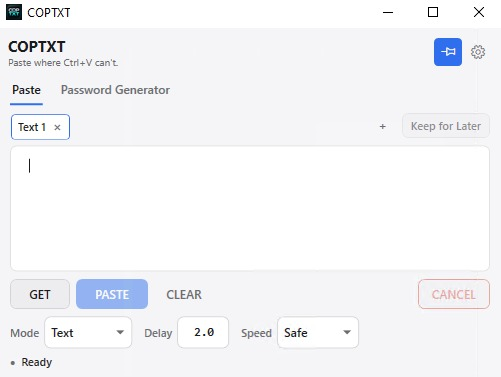
COPTXT is a lightweight Windows utility that lets you paste text into applications, remote consoles and other places where regular clipboard paste doesn't work. An optional Ctrl+Shift+V shortcut can start the paste workflow from anywhere once it is enabled in Settings.
Coming soon to Microsoft Store
Sometimes Ctrl+V simply doesn't work.
Remote consoles, virtual machines, legacy applications and restricted input fields don't always accept normal clipboard paste. COPTXT provides a simple alternative.
How it works
-
01
Copy
Copy the text you want to use.
-
02
Load
Open COPTXT, select GET and review or edit the text.
-
03
Start the paste
Select PASTE and focus the destination during the countdown. Once enabled, Ctrl+Shift+V can start the same workflow for text already loaded in the active tab.
Features
-
Paste where standard Ctrl+V is unavailable
Text is entered into the active window instead of relying on clipboard paste.
-
Optional global keyboard shortcut
Enable Ctrl+Shift+V in Settings to start the paste workflow from anywhere.
-
Keep for Later
Temporarily save text and use it later from another tab.
-
Multiple tabs
Keep several pieces of text side by side in a single window.
-
Built-in Password Generator
Create strong random passwords without leaving the app.
-
Single-instance application
One window, always the same one — no duplicate copies left running.
-
Lightweight Windows utility
A small program that stays out of your way while you work.
-
Fast startup
Opens straight away when you need it.
-
Simple interface
A plain window with the controls you need and nothing else.
-
System tray integration
Keep COPTXT available from the Windows system tray.
Nothing complicated.
COPTXT stays out of the way until you need it.
Download COPTXT
Available for 64-bit Windows.
Frequently asked questions
What is COPTXT?
COPTXT is a lightweight Windows utility for entering copied text into applications where regular clipboard paste doesn't work.
Does COPTXT replace the clipboard?
No. COPTXT works alongside the normal Windows clipboard.
Which versions of Windows are supported?
Windows 10 and Windows 11, 64-bit.
Is COPTXT free?
Yes. The current version of COPTXT is free to download and use.
Does COPTXT run in the background?
COPTXT can remain available in the Windows system tray when configured to do so. While the application is running, its optional enabled shortcut remains available. Exiting COPTXT stops it completely.